

It’s been an exciting summer of growth for VSee! With all the new fans we’ve been getting, you may have noticed some directory issues. That will no longer be the case!
Our biggest improvement is that we have upgraded our directory capacity to handle the hugantic growth we’re experiencing. The only thing is, we’ll need you to make sure your VSee has been updated to release Win 12.0.0.1012 or Mac 12.2 (13688) or above. Please, please make sure to update VSee or you may have severe problems when using VSee. We highly recommend uninstalling and re-installing from vsee.com to ensure you are on the latest version.
Once you’ve updated, try our 10 other favorite features that we’ve added since May:
1. Real names now automatically displays instead of email. Make changes to your name with “Edit Profile.”
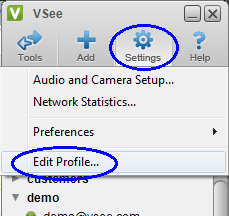
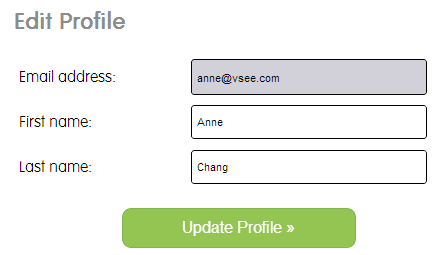
(Note: Your email is your username and cannot be changed. To change the associated email, please create a new VSee account and request that your old account be deleted.)
2. Handy “Join me on VSee” URL to immediately invite team mates and customers
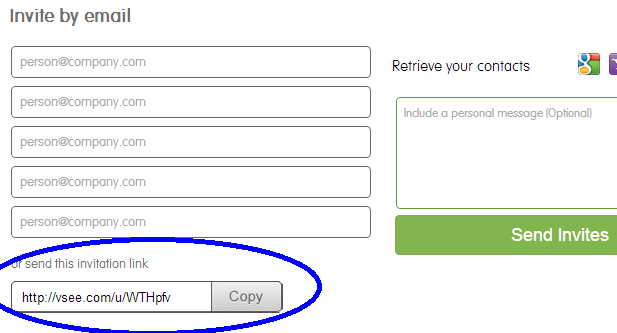
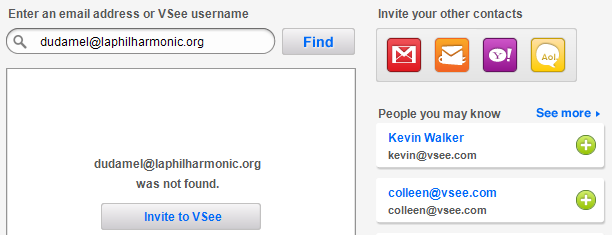
3. Convenient “Find Contacts” functions
- search for new contacts by email or username
- add contact recommendations with one click
- send email invites directly from VSee (versus a redirected webpage)
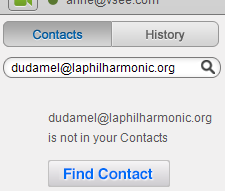
Type a contact’s email into the Search bar, and click the “Find Contact” button.
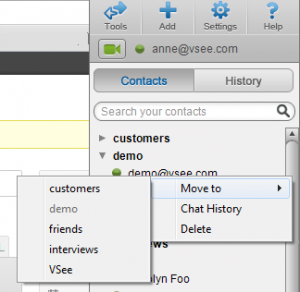
4. Move contacts easily between groups with right-click or drag-and-drop
5. Copy and paste from IM messages using keyboard shortcuts (Ctrl-X, Ctrl-V)
6. Improved camera privacy (only turns on when in call)
7. Better web proxy support (easier for enterprise users to make VSee calls)
8. Mac VSee desktop sharing
9. Mac VSee support for multiple auxiliary cameras
10. Cursor display for Mac to Windows screen share
We hope you enjoy these VSee “home improvements.” Please contact VSee support team if you have any problems, questions, or suggestions!
Follow us on Twitter (@VSee) and Like us on Facebook to hear about the latest from VSee!


