
If you’ve been wondering what the VSee development team has been up to for the past three months, download VSee 9.0.0.921. This release offers a host of improvements, including:
- New user interface
- Share button
- Streamlined setup
- Change password command
- Acoustic echo cancellation Vista
- New network layer
- Decrease in download size
- Enterprise security controls
- New support for low bandwidth
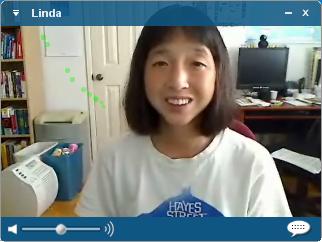 My personal favorite is what I call the “disappearing user interface.” When you first open a video window (showing you or a person you are meeting with) you see borders and menus at the top and bottom. The button at the top left calls up the menu. To its right it the name of the person in the window, and to the right of that are the Windows controls. In the bottom border are a volume control and a button to bring up the private chat. On your local video windows (not shown) is a button to bring up the address book and a box where you can directly type in the name of the person you want to call, saving you a trip to the task bar to call up the address book.
Once a video window has been open for a few seconds, the borders at the top and bottom fade away, leaving just the video with the superimposed name.
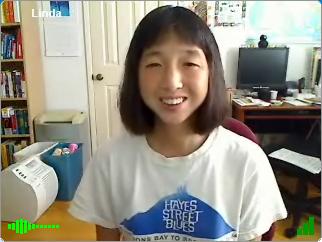 Removing the borders makes efficient use of the screen real estate, allowing you to pack in six or eight remove video windows, a few shared applications, the group chat, and still leave room to check your email 🙂
Also, it looks clean and streamlined.
Another new feature that I’ve come to depend on is a “share” button in the border of all of my other applications, so sharing an app during a meeting is as simple as clicking that button.
The process of signing up for an account and configuring VSee has been simplified. Now you can create a new account from within the product, and do not need to specify the audio devices unless you want to change from the Windows defaults.
There is a new command to change your password, which also allows single-sign-on users to use their Windows Domain ID when they are not connected to the corporate network.
This release takes advantage of the improved echo cancellation in Windows Vista (finally a reason to upgrade!).
Under the skins, this release incorporates a new network layer. In addition to speeding up call setup, this will enable a number of exciting new features to come in future versions.
You can download the new release from vsee.com/site/contents/download.html. Let us know what you think by leaving a comment here or sending email to support@vsee.com.


Great job folks – can’t wait to play with this new beta
Looks great. Can anyone tell me how to remove the annoying yellow (delay) statistics? If you have a rather large delay, over 300ms, then the yellow lines seem to take over almost half of the picture.